Copy Company
How to access the feature
Prerequisites:
- You are logged in as an Admin, Investor, or Moderator.
- Your Workspace has more than one Pipeline.
- There are companies in at least one Pipeline (imported or created).
Steps
Here's how you can make copies of master (parent) companies, and manage child companies:
- Open any company card in your Dealflow.
- Expand the dropdown menu. You will find a new option there: ‘Copy to another pipeline’. Click the button.
.png?width=670&height=310&name=image%20(7).png)
- You’ll be presented with a new modal, allowing you to choose the destination pipeline, as well as the stage, and the data that you want to copy from parent to child.
.png?width=395&height=369&name=image%20(8).png)
- Once you click ‘Copy company’, you will be presented with a success message at the bottom of the page.
.png?width=271&height=79&name=image%20(9).png)
- The parent company will now contain a new dropdown menu. Click ‘Also-in’, and you will see which Dealflow pipelines and Portfolio funds contain copies of the parent company. Clicking the name will redirect you there.
.png?width=670&height=315&name=image%20(10).png)
Please just keep in mind that the copies will be independent, meaning that the changes made to parent/child will not reflect on the corresponding child/parent.
This feature is only available in Dealflow.
Transfer Company
How to access the feature
Prerequisites:
- You are logged in as an Admin, Investor, or Moderator.
- Your Workspace has more than one Pipeline in Dealflow, and more than one Fund in Portfolio.
- There are companies in at least one Pipeline, and at least one Fund (imported or created).
Steps
Here's how you can transfer companies to different funds or pipelines:
1. Open a company profile in Portfolio or Dealflow.
2. Expand the dropdown menu. You will find a new option there: ‘Transfer to another pipeline/fund’. Click the button.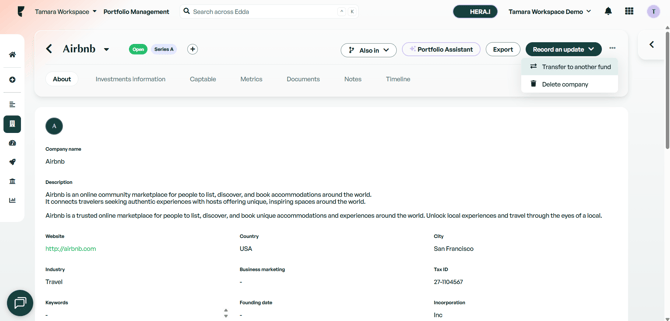
3. You'll be presented with a new modal, allowing you to choose the destination fund. Selecting the fund will unlock the 'Transfer company' button. Click the button to move the company to the selected fund.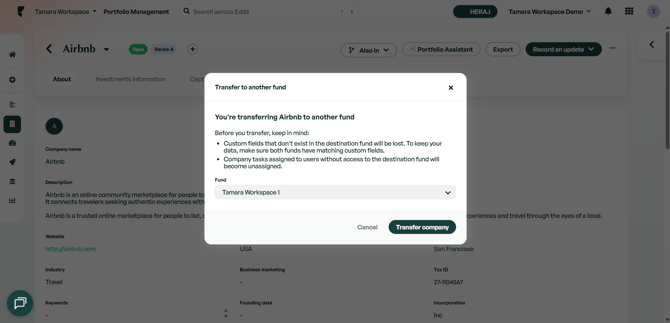
4. Please bear in mind that, if the destination fund isn't in the same currency as the original one, you will be prevented from transferring the company:
5. If the company is transferred successfully, you'll be presented with the following success message, and you'll be redirected to the transferred company profile: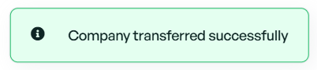
If there is anything you need more information on, please contact our support team on the platform, we are always happy to help!