-
Customize Dealflow default stages
-
Company Profiles - Notes Tab improvements
-
Resize columns in list view
-
Fund overview now includes MOIC & more
-
Mobile App - Metrics
-
Scan a business card to add a contact
-
& more!
You can now customize Dealflow default stages
We’ve listened to your feedback! You can now edit and delete the default Dealflow stages, and change their order so the board reflects your own pipeline. Custom stages were already editable, and now the stages that come with Edda are too. Head to Settings > Pipeline > Workflow plan to customize them.
We've added a few improvements to the Notes tab in company profiles
We redesigned the Notes tab in Dealflow and Portfolio to make notes easier to scan and write. You can change the view between list and cards, and when adding or editing a note, we've also added more text styling options for your content.
You can now resize columns in list views in Dealflow and Portfolio
You can now drag the edge of any column in list view to adjust its width and make the table easier to read. The size you choose will remain when you refresh the page. Plus, in the next few weeks we'll be rolling out this change for even more tables in our apps.
The company profile timelines will now record operation edits
When an investment, or a round you didn’t participate in, is edited or deleted, the Portfolio timeline now records it as a separate item. You can see exactly what changed and when.
MOIC and more metrics in the fund overview
The fund overview now shows MOIC along with additional performance metrics, so you can assess a fund at a glance.
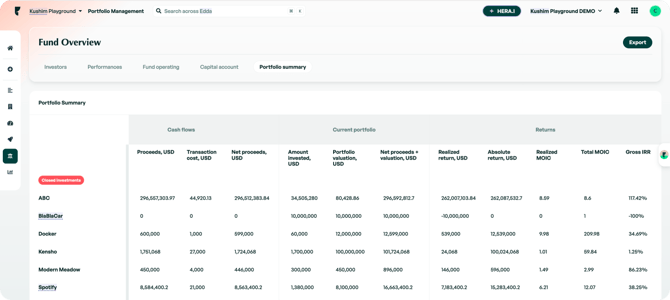
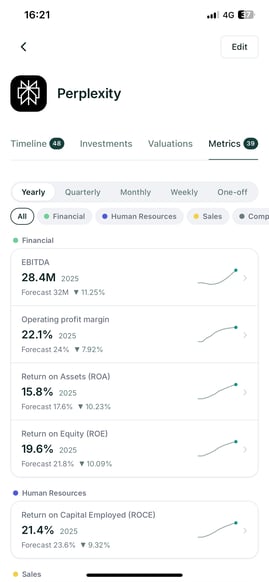
Metrics are now available in the mobile app
Your metrics are now visible in the Edda mobile app in company profiles for Dealflow and Portfolio. You can find them in the company profile, metrics tab.
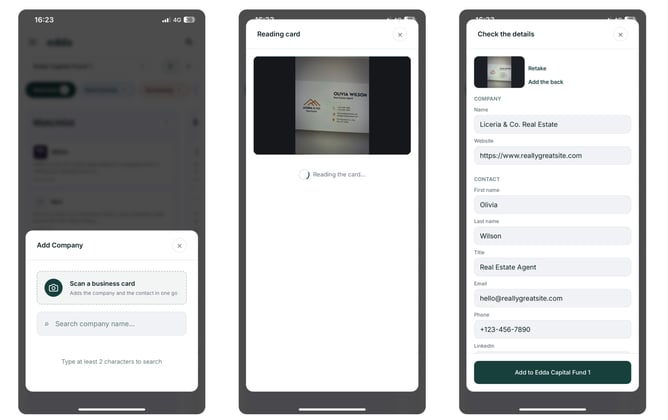
Scan a business card and Edda's mobile will create the company in your Dealflow
Scan a business card with your phone and Edda creates the company for you.
You can now disable users via our API
Our API now supports disabling a user, which makes offboarding easier to automate for you.
We also fixed some bugs:
- We fixed an issue that made fields not attached to a fund appear on company exports.
- In the Fund Overview > Portfolio summary page, we corrected how portfolio valuation is displayed per company row. This change will impact the Multiple to cost metric in the same table (now renamed to MOIC, as indicated in the improvement described in this article).
- In the Contacts app, the Emails tab on a contact now shows the contact’s emails correctly.
- We identified an issue in which the mobile app asked users to log in every hour or so. We've fixed this.
- We've made a fix that blocks email addresses (such as a Gmail address) from being entered in a company’s website field. This prevents incorrect email and document syncing for specific companies.