We now support multiple share types and classes in equity investments
You can now record and manage multiple share types and classes within a single equity investment. This is available across initial investments, follow-ons, and conversions to equity.
This means you can accurately reflect the real capital structure of a company, including common shares, preferred shares, and various share classes (e.g., Class A, Class B, Series A Preferred, etc.), all within one investment record.
Exits are now also share-based, meaning every exit is tied to the specific shares being sold or liquidated. This makes your portfolio records significantly more granular and precise, giving you a much clearer picture of your position at every stage of an investment's lifecycle.
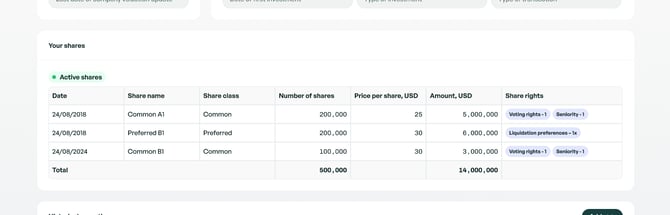
You can now record share rights
Alongside share classes, you can now attach specific rights to shares, such as voting rights, liquidation preferences and seniority.
Why it matters: Share rights directly impact valuation and exit scenarios. Recording them ensures your portfolio reflects the true economic and governance structure of each investment.
We've improved the user experience of some key flows in Portfolio
- Initial investments and follow ons — Stepped approach, cleaner entry of share count, price per share, investment amount and calculations.
- Conversions — Streamlined tracking of convertible instruments converting into equity.
- Share splits — Automatic adjustment of share counts and per-share values after a split, and autocalculations using ratios.
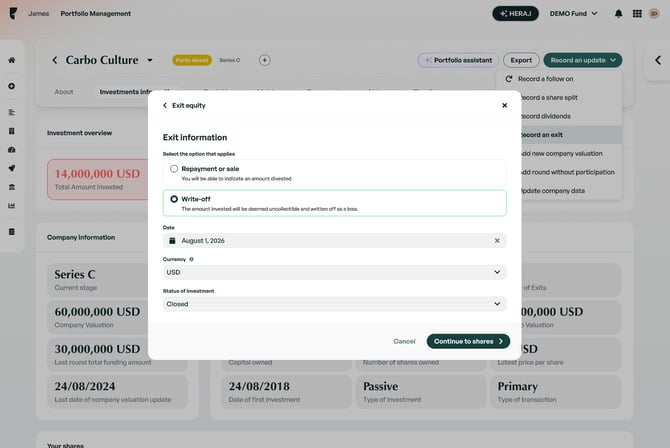
- Exits — Improved exit flow capturing exits per share class, and improved support for write offs.
We've also added a summary page that displays all the information you've recorded in an operation before submitting it to Portfolio. This gives you a chance to review everything at a glance and ensure your data is accurate before it's saved.
Goodbye Database - An enhanced Companies Table View is here
We're letting go of our old Database table, which will be now substituted by an enhanced table view in the Companies section. This section has been redesigned for clarity and usability, and to allow for better edits when you need them. You can now see richer data at a glance, with improved columns, sorting, and filtering options to help you navigate your portfolio more efficiently.
We now have improved support for write-off operations
Recording a full or partial write-off of an investment is now more straightforward. You can mark an investment as written off, specify the write-off date, and have valuations update accordingly.
Why it matters: Write-offs have a direct impact on portfolio valuation. Cleaner write-off handling means the operations in Portfolio are correctly labeled, and your performance metrics stay accurate without manual adjustments.
We've shipped a bunch of new API endpoints and improved existing ones
New endpoints:
- Investments — Create, retrieve, update, and delete investment records for portfolio companies. Supports Equity, Convertible Note, and SAFE instruments, with full details including valuations, share counts, FX rates, and round data.
- Investment Shares — Record and manage individual share tranches within an investment, including share class, voting rights, liquidation preferences, and seniority.
- Conversions — Record the conversion of convertible notes or SAFEs into equity or new convertible instruments.
- Exits — Record partial or full exits from a portfolio company, including repayments and write-offs.
- Dividends — Record dividend payments received from portfolio companies.
- Share Splits — Record share split events for portfolio companies.
- Share Types — Create custom share type labels (e.g. "Series A Preferred") reusable across your workspace.
- Share Classes — List available share classes with their structural characteristics.
- Company Operations & Valuations — Retrieve the full operation history and valuation history for any portfolio company.
- Fund Company Creation — Add a company directly to a fund, with support for auto-filling details from Crunchbase, PitchBook, or Dealroom, or promoting an existing dealflow company.
Updated endpoints
- Fund data on company objects — The
fundproperty is now returned on company objects across a much wider set of endpoints, including list, search, timeline, and pipeline endpoints. - Fund count fields are now optional — The
company_count,open_count,closed_count, andpartly_closed_countfields on fund responses may now be omitted when not applicable. Please ensure your integration handles their absence gracefully. - Fund workspace settings — A new
hidden_table_columnsfield is available onPATCH /funds/{fund}/workspaceto control which columns are hidden in fund table views.
Portfolio navigation is now cleaner and streamlined
All portfolio operations are now centralized within the company profile, rather than being spread across different tabs in the sidebar. This means fewer clicks and a more intuitive, cleaner workflow when managing your investments.
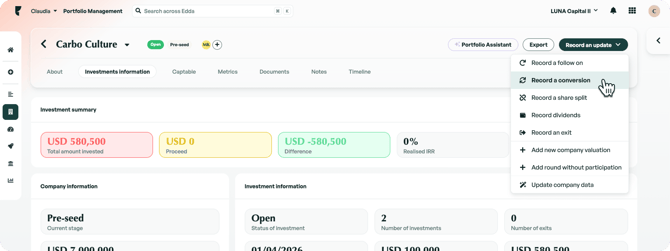
Editing operations just got easier
You can now edit any operation by clicking the Edit button, which opens the familiar "Record an Operation" panel with all your existing information pre-filled. No more hunting through individual cells in a table to update your investments! everything is in one place, clean and straightforward.
We also fixed a few bugs, and made other general updates
-
A few historical bugs in regards to exports where some exit operations were treated and counted as investments. These bugs were impacting a few columns in exports. This is now solved and from now on, exit operations are not considered investments or have a series funding attached to them.
-
When recording warrants, the fields Number of warrants and Exercise price have historically been recorded into the 'Number of Shares' and ‘Price per share’ columns in Portfolio, which caused actual company shares to be miscounted. We've fixed this, from now on these values will be stored in their dedicated columns. You can find them in the Company profile's Historical operations table and in the new Companies page table view.
- A bug impacting Company valuations and Portfolio valuations, where updating these values in the Database page would not update these values in other places of the Portfolio app. This was affecting only a very low number of customers, and is now fixed. If these updates impacted your existing company or portfolio valuations and you need personalized assistance, our team is available via Live Support Chat or at support@edda.co.