---
title: Product Improvements - July 2026
description: "New in Edda: multiple share types, share rights, improved exit flows, and a redesigned company table. See what's changed in Portfolio Management."
---
[Skip to content](https://help.edda.co/product-improvements-july-2026#main-content)
Open main navigation
Close main navigation
Advice and answers from the Edda Team
- There are no suggestions because the search field is empty.
1. [Edda Help Center](https://help.edda.co/?hsLang=en)
2. [Portfolio Management](https://help.edda.co/portfolio-management?hsLang=en)
# Product Improvements - July 2026
## Preview: New Edda improvements make it faster to evaluate deals, easier to manage your portfolio, and simpler to move between pipelines. Here's everything that shipped.
### LinkedIn links, right where you need them
It’s finally here. Edda now automatically pulls the LinkedIn profile links for contacts of companies added through a data provider (Crunchbase, Dealroom, Pitchbook). Every contact profile now includes now includes a "See on LinkedIn" button that takes you straight to their profile.
If a contact wasn't added through a data provider, you can add their LinkedIn URL manually too, or add the information via the data import section in Settings.
Identify the founders and decision makers you care about in seconds, right from within Edda. Less digging, more sourcing.
---
### **Copy companies to another pipeline**
We created a new button in Dealflow that lets you copy a company to another pipeline in one action.
Choose exactly what comes with it: contacts, metrics, documents, comments, and notes. You also pick the stage the company should land in on the new pipeline.
---
### Jump between pipelines with "Also in"
If the same company lives in more than one of your pipelines, the new "Also in" button lets you jump between them instantly. Click it, and a dropdown shows you every other pipeline that company appears in.
The pairing between companies happens automatically based on website domain. To link two records together, just make sure the Website field in the About section matches exactly across both.
See video above for reference.
---
### Choose how apps and search results open
A small change with a big quality-of-life impact: you can now control whether apps open in the same tab or in a new one, via a toggle in the apps menu. The same toggle applies to search results. Set it once and browse Edda the way that suits you.
---
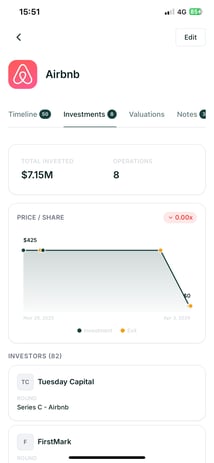
### Investment data, now on mobile
The Investments tab on each company profile is now available in the Edda mobile app. Check funding rounds, valuations, and investment details on the go, no laptop required.
---
### Smarter suggestions for portfolio valuation
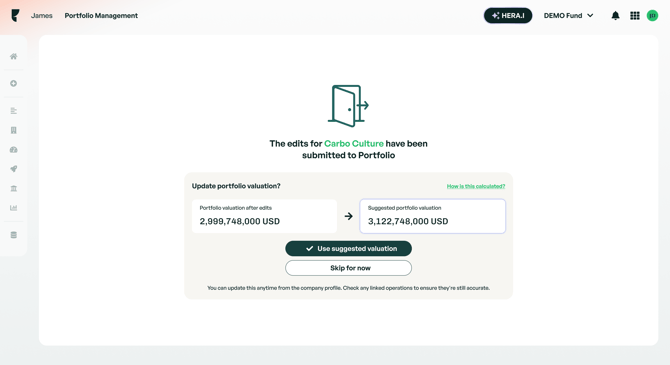
Keeping portfolio valuations accurate as you edit investment operations just got easier. When you edit an operation, Edda now compares your company's current portfolio valuation against what it calculates the valuation should be based on that edit. If there's a discrepancy, you'll see a suggestion on the confirmation screen with the option to update the valuation to the calculated figure, or skip it and keep things as they are.
This is a suggestion, not an automatic override. You stay in control, with better visibility into when your numbers might need a second look.
---
### **More visibility into round history within the company profile**
We've added three new columns to the historical operations table on portfolio companies:
- Total shares issued in this round
- Pre-money valuation
- Total round funding amount
More context on every round, without having to dig through documents.
---
### Three new API endpoints
We've expanded the data-dump API with two additions our customers have been asking for:
**Investment data extraction.** Previously, pulling a data-dump would fetch your companies and timelines, but investment-related data for portfolio companies was left out. You can now request a new `investments` data type that returns full investment data for every company in your workspace.
**Owners and referents.** The data-dump API was returning empty values for owners (referents) on every entity, regardless of who was actually assigned. This is now fixed, and the API correctly lists all referents for each entity.
**Average days spent in each stage.** A new endpoint returns the average number of days companies spend in a given stage. You can pull this as an overall figure across all stages, or filtered down to a specific one.
Together, these mean your data-dump exports finally give you the full picture, investments, ownership, and stage timing included.
---
### Bug fixes
**Portfolio valuation miscalculations:** We identified and fixed an issue where share splits, rounds without participation, and dividends could cause the Portfolio valuation to be calculated incorrectly for some companies. If you've noticed valuation figures that looked off, this fix addresses it. If you still have questions, reach out to support.
**Metrics showing blank instead of zero on export:** When exporting a portfolio company, any metric with a value of 0 was showing up as a blank cell instead of displaying "0". This has been fixed, so exported metrics now accurately reflect zero values instead of appearing empty.
**Contact information missing when editing a company in Dealflow:** Contact information wasn't displaying correctly when editing a company in Dealflow. This has been fixed, so contact details now show up as expected while editing.
**Convertible notes staying marked as converted after deletion:** If a conversion round was deleted, the convertible notes involved stayed marked as "converted" and didn't become available for future conversions. Notes are now correctly unmarked as converted when their conversion round is deleted, so they're available again for subsequent conversions.
---
Questions about any of these features? Reach out to the support team, we're happy to walk you through them.
- [Dealflow](https://help.edda.co/dealflow?hsLang=en#main-content)
- [Administration](https://help.edda.co/dealflow?hsLang=en#administration)
- [Company Profiles](https://help.edda.co/dealflow?hsLang=en#company-profiles)
- [How To's](https://help.edda.co/dealflow?hsLang=en#how-tos)
- [Features](https://help.edda.co/dealflow?hsLang=en#features)
- [Portfolio Management](https://help.edda.co/portfolio-management?hsLang=en#main-content)
- [Company Profiles](https://help.edda.co/portfolio-management?hsLang=en#company-profiles)
- [Operations](https://help.edda.co/portfolio-management?hsLang=en#operations)
- [Fund Management](https://help.edda.co/portfolio-management?hsLang=en#fund-management)
- [Graphs and Data Visualization](https://help.edda.co/portfolio-management?hsLang=en#graphs-and-data-visualization)
- [Document Center](https://help.edda.co/document-center?hsLang=en)
- [Integrations](https://help.edda.co/integrations?hsLang=en)
- [Contact](https://help.edda.co/contact?hsLang=en)
- [Administration](https://help.edda.co/administration?hsLang=en)
- [LP's portal](https://help.edda.co/lps-portal?hsLang=en)
- [General](https://help.edda.co/general?hsLang=en)
- [Use cases](https://help.edda.co/use-cases?hsLang=en)
[.png?width=73&height=24&name=image%20(5).png "Chill listening crop-3")](http://edda.co)
Edda Help Center
Copyright © 2026, Edda
```json
{
"@context" : "https://schema.org",
"@type" : "VideoObject",
"contentUrl" : "https://26231736.fs1.hubspotusercontent-eu1.net/hubfs/26231736/video_assets/433169729771/inherited/web_optimized.mp4",
"dateModified" : "2026-07-07T14:24:09.180Z",
"duration" : "PT16S",
"height" : 1080,
"name" : "Linkedin",
"thumbnailUrl" : "https://26231736.fs1.hubspotusercontent-eu1.net/hubfs/26231736/Linkedin.mp4/medium.jpg",
"uploadDate" : "2026-07-07T14:24:00.775Z",
"width" : 1648
}
```
```json
{
"@context" : "https://schema.org",
"@type" : "VideoObject",
"contentUrl" : "https://26231736.fs1.hubspotusercontent-eu1.net/hubfs/26231736/video_assets/433169468645/inherited/web_optimized.mp4",
"dateModified" : "2026-07-07T14:10:33.967Z",
"duration" : "PT15S",
"height" : 1080,
"name" : "copy and also on",
"thumbnailUrl" : "https://26231736.fs1.hubspotusercontent-eu1.net/hubfs/26231736/copy%20and%20also%20on.mp4/medium.jpg",
"uploadDate" : "2026-07-07T14:09:48.165Z",
"width" : 1648
}
```
```json
{
"@context" : "https://schema.org",
"@type" : "VideoObject",
"contentUrl" : "https://26231736.fs1.hubspotusercontent-eu1.net/hubfs/26231736/video_assets/433170489570/inherited/web_optimized.mp4",
"dateModified" : "2026-07-07T14:18:26.076Z",
"duration" : "PT7S",
"height" : 1080,
"name" : "apps",
"thumbnailUrl" : "https://26231736.fs1.hubspotusercontent-eu1.net/hubfs/26231736/apps.mp4/medium.jpg",
"uploadDate" : "2026-07-07T14:18:17.191Z",
"width" : 1648
}
```
```json
{
"@context" : "https://schema.org",
"@type" : "VideoObject",
"contentUrl" : "https://26231736.fs1.hubspotusercontent-eu1.net/hubfs/26231736/video_assets/433170486481/inherited/web_optimized.mp4",
"dateModified" : "2026-07-07T14:15:29.088Z",
"duration" : "PT8S",
"height" : 1080,
"name" : "results",
"thumbnailUrl" : "https://26231736.fs1.hubspotusercontent-eu1.net/hubfs/26231736/results.mp4/medium.jpg",
"uploadDate" : "2026-07-07T14:15:16.827Z",
"width" : 1648
}
```